
Mail List Builder
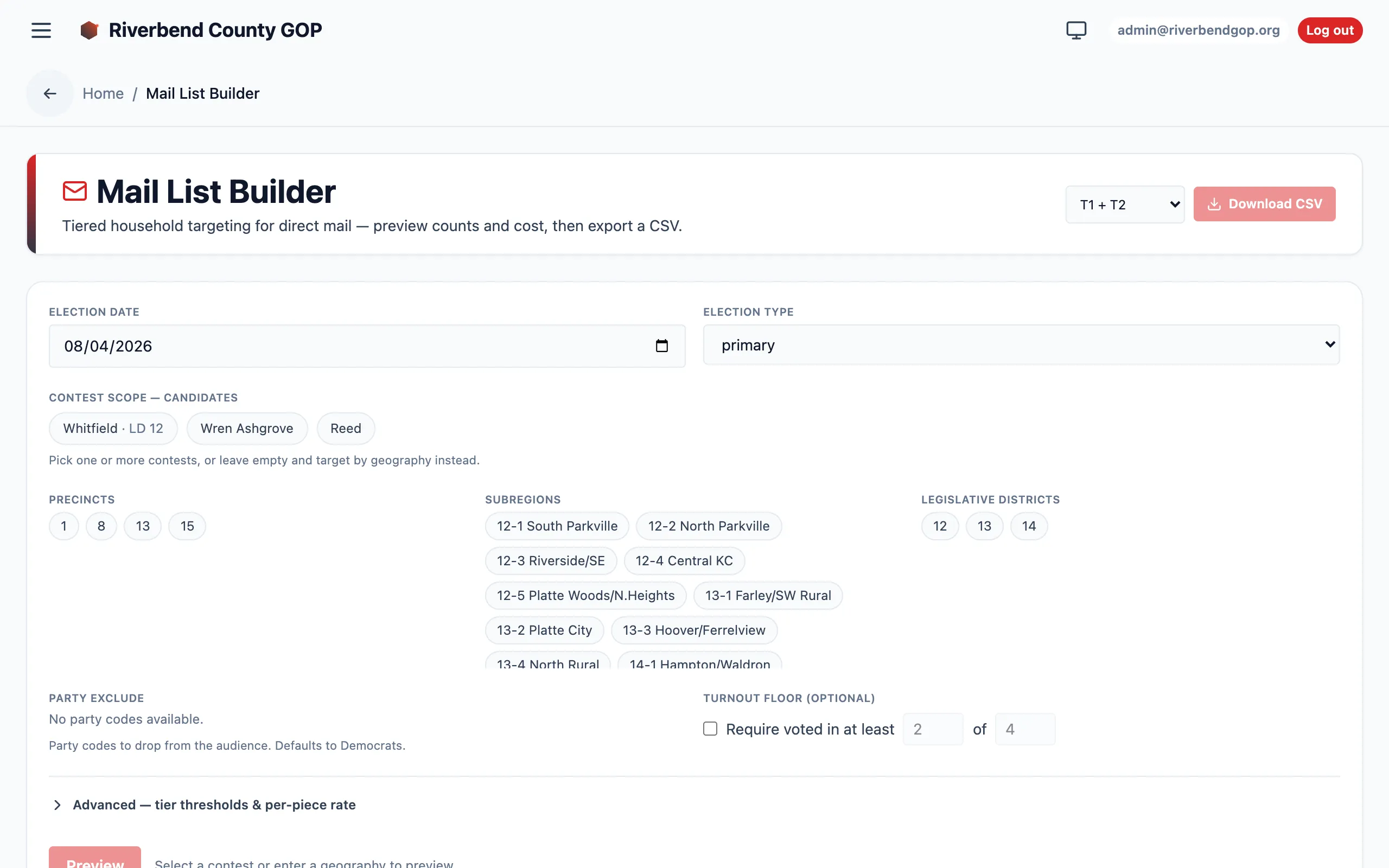
The Mail List Builder extends Voterra beyond door and text into mail outreach. Given your targeting filters, it returns a household-deduplicated list of high-propensity, Republican-leaning addresses — split into propensity tiers, with piece counts and mail cost, exported as a mail-ready CSV.
It answers the question a campaign asks before every mail buy: “Which households are actually worth a piece, and what will it cost to mail them?”
When to use it
Section titled “When to use it”Reach for the Mail List Builder when you want to reach a universe by mail rather than by door or text. It’s the outreach channel for the households a canvasser can’t get to — or shouldn’t spend a shift on — but who are still worth a targeted piece. Because the output is tiered and priced, it’s also the tool you open when a campaign needs to size a mailer against a budget before committing to a print run.
The tier model
Section titled “The tier model”Every household lands in one of three propensity tiers:
| Tier | Meaning |
|---|---|
| T1 | Most-R — the highest-propensity Republican-leaning households. |
| T2 | Mainly-R. |
| T3 | Probably-R. |
Tiers are cumulative: T1 ⊂ T1+T2 ⊂ T1+T2+T3. Buying a wider tier set never drops a household from a narrower one — it only adds the next band out. That’s deliberate, so a campaign can buy tiers to budget: mail T1 only when money is tight, widen to T1+T2+T3 when it isn’t, and know the piece count and cost at each step.
How the propensity score works
Section titled “How the propensity score works”The score behind the tiers is a composite: precinct-level Republican lean × per-voter turnout probability.
- Precinct R-lean is modeled from precinct general-election results, not read off a party field. Missouri is an open-primary state with no per-voter party registration, so there is no registered-party column to trust — R-lean is inferred from how the precinct actually votes.
- Turnout probability is the per-voter turnout prediction.
Multiplying the two rewards households that are both in Republican-leaning territory and likely to actually vote — the households a mail piece can move.
Household deduplication
Section titled “Household deduplication”Mail is a per-household channel — two voters at one address get one piece, not two. The builder collapses the roll to one record per household before it counts or prices anything, so the piece count you see is the number of envelopes, not the number of voters. Missouri’s roll has no household key, so households are derived from the normalized mailing address.
Cost estimation
Section titled “Cost estimation”Every preview returns piece counts and an estimated cost per tier. Cost is simply households × a configurable per-piece rate (default $0.73). Because tiers are cumulative, you get three budget options from one preview:
- T1 pieces × $0.73
- (T1+T2) pieces × $0.73
- (T1+T2+T3) pieces × $0.73
Pick the tier set that fits the budget, and the piece count is your print order.
Contest scope
Section titled “Contest scope”Targeting geography reuses each candidate’s geographic reach — the same contest scope that drives door and text. Point the builder at a contest and it pulls the households inside that candidate’s precincts, subregions, or legislative district, so a mail universe and a walk universe are cut from the same map.
Compliance & the disclaimer column
Section titled “Compliance & the disclaimer column”The exported CSV includes a configurable “Paid for by …” disclaimer column, so the payer attribution rides along with the address list into the mail house rather than being bolted on later. Set the disclaimer text for the campaign and it populates on every row.
How to build a mail list
Section titled “How to build a mail list”-
Choose the contest. Pick the candidate/contest whose geographic reach defines the universe.
-
Set the filters. Narrow the roll — party (Democrats and non-R-leaning households are excluded), propensity tiers, and any geography inside the contest scope.
-
Preview the tiers. Run the preview. You get household counts for T1 / T1+T2 / T1+T2+T3 and the dollar cost of each at the per-piece rate.
-
Pick a tier to budget. Compare the three cost options against the mailer budget and choose how wide to go.
-
Set the disclaimer. Enter the “Paid for by …” text for the campaign.
-
Export the CSV. Click Download CSV. One row per household, tier-labeled, disclaimer populated — ready to hand to the mail house. The export is audit-logged.
Who can preview vs. export
Section titled “Who can preview vs. export”| Action | Who |
|---|---|
| Preview — per-tier household counts + estimated cost. | Analysts, admins, and management roles. |
| Export — the mail-ready CSV (one row per household, tier + disclaimer). | Bulk-export roles only. |
The preview is available to anyone who can read the analytics — including analysts, who can size and price a universe without seeing individual PII. The export is gated more tightly to the roles that carry bulk PII export, since the CSV is individual addresses leaving the system.