
Roles & access
Access in Voterra is role-based and scoped per organization. The hamburger menu is filtered to a role’s allowed features, and two extra gates control the sensitive data underneath: PII access (seeing individual voter names, addresses, and phone numbers) and analytics access (seeing aggregate rollups). This page is the canonical “who sees what” reference.
Access = role × scope
Section titled “Access = role × scope”Access has two independent dimensions:
- Role — what you can do (read voters, build routes, send texts, manage users). That’s what this page covers.
- Scope — where you can do it. By default a user sees the whole organization, but they can optionally be restricted to one or more geographic turfs. A scoped user’s maps, voter lists, and analytics all narrow to their turf — enforced everywhere in the app, not just hidden from the menu.
The two combine: a Coordinator role scoped to “LD 12” can do everything a coordinator does, but only for LD 12. Scope is assigned by an Admin.
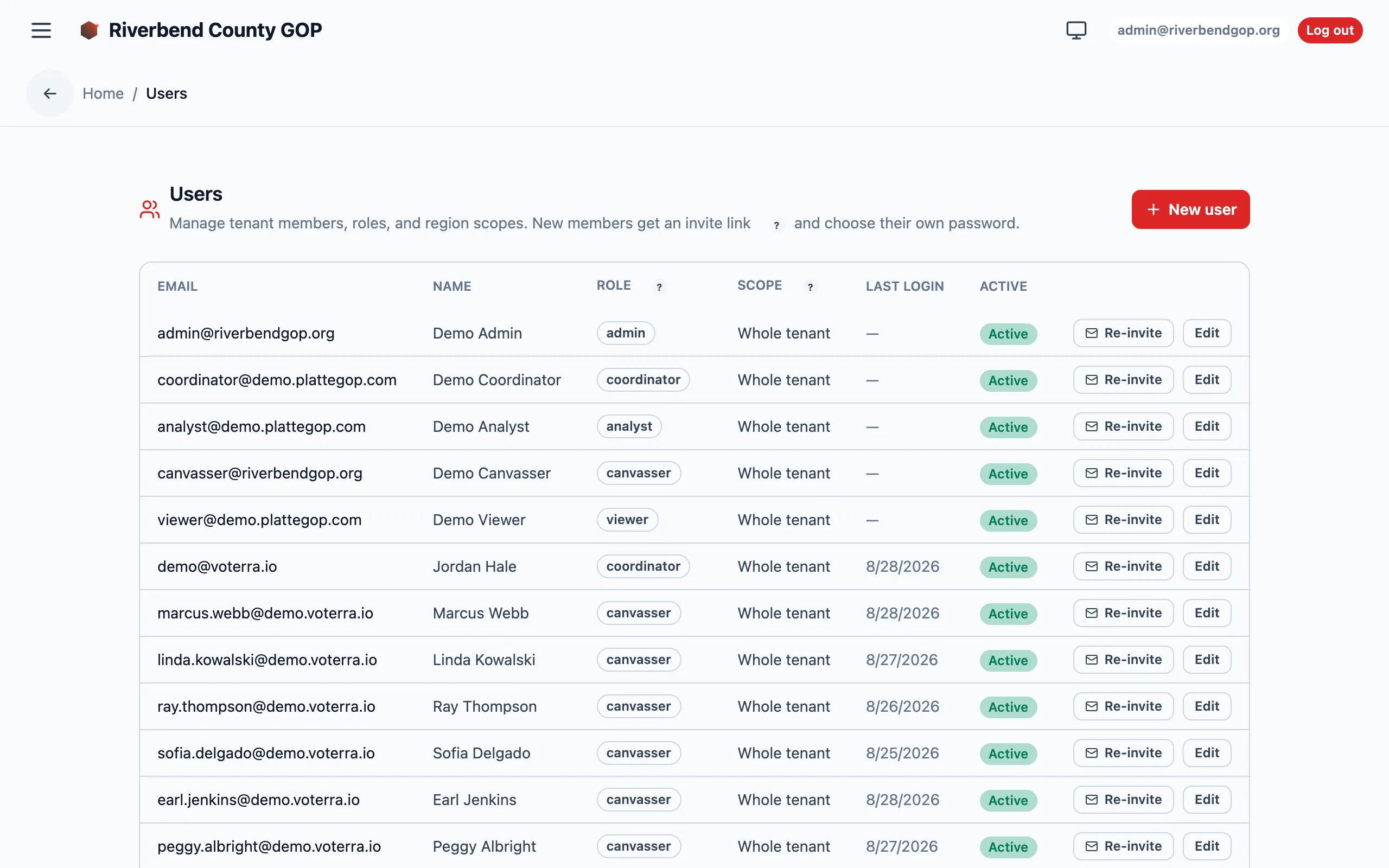
Role and scope live side by side on the Users screen, where an admin assigns both (names and emails blurred for privacy).
The nine roles at a glance
Section titled “The nine roles at a glance”| Role | One-line job | PII | Bulk export |
|---|---|---|---|
admin | Organization operator — everything inside one organization | yes | yes |
org_manager | Organization owner — full access inside the organization | yes | yes |
manager | Legacy alias for org_manager | yes | yes |
coordinator | Field coordinator — turfs, assignments, review | yes | — |
canvasser | Door knocker — assigned routes only | assigned only | — |
analyst | Analytics viewer — aggregates, no individual PII | — | — |
viewer | Read-only demographics & maps | — | — |
messenger | Peer-to-peer SMS sender | yes (to text) | — |
sms_manager | Batch SMS author — templates & audiences | yes | — |
candidate | A candidate’s own login — their race, their turf | in-turf only | — |
Feature access matrix
Section titled “Feature access matrix”A ✓ means the feature appears in that role’s navigation and is usable. Blank means hidden or forbidden.
| Feature area | admin | org_manager | coordinator | canvasser | analyst | viewer | messenger | sms_manager | candidate |
|---|---|---|---|---|---|---|---|---|---|
| Maps & geography drill-down | ✓ | ✓ | ✓ | ✓ | ✓ | ✓ | ✓ | ✓ | ✓‡ |
| Voters list | ✓ | ✓ | ✓ | assigned | ✓* | ✓* | ✓ | ✓ | ✓‡ |
| Intelligence & analytics | ✓ | ✓ | ✓ | — | ✓ | ✓ | — | ✓† | ✓‡ |
| Route optimizer & planning | ✓ | ✓ | ✓ | — | ✓ | — | — | — | — |
| Canvass shift (field) | ✓ | ✓ | ✓ | ✓ | — | — | — | — | — |
| Canvass review (AAR inbox) | ✓ | ✓ | ✓ | — | — | — | — | — | — |
| Campaign content (issues, scripts) | ✓ | ✓ | — | — | ✓ | — | — | — | — |
| P2P messenger queue | ✓ | ✓ | — | — | — | — | ✓ | ✓ | — |
| Batch SMS campaigns | ✓ | ✓ | — | — | — | — | — | ✓ | — |
| 10DLC number pool | ✓ | — | — | — | — | — | — | — | — |
| Data Changes (import diff) | ✓ | — | — | — | — | — | — | — | — |
| Enrichment reconcile | ✓ | — | — | — | — | — | — | — | — |
| Settings (organization branding) | ✓ | — | — | — | — | — | — | — | — |
| Glossary | ✓ | ✓ | ✓ | ✓ | ✓ | ✓ | ✓ | ✓ | ✓ |
* analyst and viewer don’t get a voters-list view. They see the same
population only in aggregate — counts, tiers, and density on the map and
heatmaps — never individual PII.
† sms_manager gets only the audience-building analytics (heatmap + R-lean),
not the full intelligence suite.
‡ candidate sees the map, the voters list, and the analytics suite — but only
inside their own district. The same turf scoping that narrows any scoped user
walls a candidate to their race’s geography automatically. They are deliberately
not a bulk-export role. Reading is not all they do: a candidate maintains
their own public profile, and — where the committee grants it — adds their own
field volunteers. Both are bounded to their race. See
Candidate.
PII vs. analytics gates
Section titled “PII vs. analytics gates”Two permissions sit beneath the navigation:
- PII read — required to see individual voter identity (name, address, phone). Held by admins, org managers, coordinators, canvassers (assigned voters only), messengers, SMS managers, and candidates (their own turf only).
- Analytics read — required to see aggregate rollups (heatmaps, drop-off, coverage, R-lean). Held by admins, org managers, coordinators, analysts, and viewers.
Note the deliberate split: analysts and viewers get analytics but not PII, and messengers and SMS managers get PII (so they can text real people) but not the full analytics suite. The candidate is the one role that gets both — bounded to a single district instead of the whole organization.